# New Adventures in Modeling
Use, modify and create computational simulations with StarLogo NOVA: a 3D agent-based modeling environment specifically designed for teachers and students for teaching and learning science.
# Dedication
To my father, Eddie (r.i.p), who inspired my interest in computers in the mid-80s and passed on his dream of going to MIT.
To my mother, Chichi, who instilled in me the value and joy of reading.
To my wife, Liliana (a.k.a Lilo), who gives meaning to everything I do (always) and takes pride in my achievements (almost always).
To Domingo, Teresa, and Francisco, who are our greatest challenge and our happiest adventure.
To my uncle, Jorge A. Rizzi, who invited me to work at SADOI, where I learned about and fell in love with LOGO and simulations.
To Jorge A. Rey Valzacchi, a pioneer in integrating technology into education in Argentina.
To Rosa Kaufman, a trailblazer of LOGO in education in Argentina.
To my friends, who never quite understood what I do for a living, but appreciate it all the same.
# Acknowledgments
Many people, many of them involuntarily, have contributed to bringing this book to life. I would like to name them, in no particular order, while trying not to forget anyone.
First and foremost, to my wife **Liliana** (a.k.a Lilo), because she is a great fighter and has always been by my side unconditionally, no matter how difficult the times were. She is present in the dedications as part of the inspiration, but it would be unfair to omit her in this space.
Secondly, but more fundamentally, as this book would not have been possible without their support, thanks to [MIT Scheller Teacher Program](https://education.mit.edu), in the person of **Daniel J. Wendel**, Lead Software Developer at MIT STEP, who always helped me during my trips to MIT (since 2010) and patiently and dedicatedly answered my questions and doubts over these fourteen years of working together, since I first attended to Imagination Toolboox at MIT. Additionally, Daniel helped make the translations of StarLogo (TNG and NOVA) into Spanish possible. Finally, Daniel also managed the funding to bring this book to life.
Most of the inspiration I needed to write this book is thanks to **Mitchel Resnick**, creator of StarLogo and Scratch; **Eric Klopfer**, Director of the Scheller Teacher Education Program at MIT, and **Vanessa Colella**, authors of the book that inspired mine. Mitch and Eric are also the authors of numerous articles that are essential references for me. In their work, I also owe an enormous debt of gratitude to Seymour Papert, a great inspiration and the father of technology in education.
To the [School of Education of Universidad de San Andrés](https://udesa.edu.ar/escuela-de-educacion), in the persons of especially **Mariu Podestá** but also **Melina Furman** (r.i.p), **Jason Beech**, **Ángela Aisenstein** and **Alejandro Artopoulos**, who always trusted my work and supported me in multiple initiatives that contributed to my development as an educator and specifically to my expertise as a teacher and computational modeler. Without those opportunities, this book might never have been written.
Finally, a giant thanks to all the teachers who attended **Imagination Toolbox** workshop and **Modeling4All** Project who considered StarLogo NOVA a valuable tool, because their belief gives this book its meaning.
# How the Book is Organized
*New Adventures in Modeling* is organized by “**stimulations**” and “**simulations**.” The stimulations are short informative texts that describe a certain phenomenon of nature that, to say the least, is curious. The stimulation is described accompanied by an image and the reference source(s) is cited.
Each **stimulation** is followed by a **simulation** in the form of a **challenge**. The challenges are an invitation to playful learning (“playful learning”, Resnick, 2004) and consist of describing a possible, simple scenario in which to face the challenge and solve it.
The challenge summarizes the task to be solved by the modeler on duty (perhaps the reader) in three or four paragraphs at most, the curricular connections and the associated computational concepts.
Following each challenge, a complete, detailed, numbered and imaged tutorial of ONE possible solution to the challenge is provided.
We hope this will be of great help, especially for readers who consider themselves newbies and who do not have much familiarity with the modeling tool (StarLogo NOVA).
Or also for teachers who want to work on these challenges with their students.
There may also be those who do not wish to look at the solution, or look at it after completing their own solution to the challenge.
Also in cases where it warrants, the necessary files will be provided through a link to download and/or access them.
Having then made the presentation, I invite you to read the first stimulation and get excited about the first challenge.
Enjoy the journey, dear modeling adventurers!
**Cristián Rizzi Iribarren**, *Buenos Aires, January 202*5.-
# A recursive story
### **A book as an object to think with**
[](https://books.aprendercontecnologia.net/uploads/images/gallery/2025-01/con-mitch-fondo-tapa-libro.jpg)This work is deeply inspired by one of the books I enjoy reading the most (because I still do): “[**Adventures in Modeling**](https://web.mit.edu/mitstep/starlogo/adventures/index.html)” (AiM) by **Mitchel Resnick**, **Eric Klopfer**, and **Vanessa Colella**, all of MIT (Massachusetts Institute of Technology) at the time the book was published in May 2001. The book is about agent-based modeling using a very simple programming language called StarLogo™. In the image, composed by me using the book cover as the background, I am with Mitch during my visit to the [**Scratch Conference**](https://en.scratch-wiki.info/wiki/Scratch@MIT_2010) in August 2010, just before attending the [**Imagination Toolbox**](https://education.mit.edu/project/imagination-toolbox/) workshop. Both events took place at MIT in Cambridge, Massachusetts.
AiM book is organized by *challenges* and *activities*. The **activities** are specially designed to be carried out experientially and without the computer. Each of the activities is followed by a challenge to be solved by creating simulation models that take aspects raised in the activities. These **challenges** must be solved using the **StarLogo™** programming language. The book offers help and guides to complete each challenge that consists of programming a specific simulation model.
**Mitch Resnick**, in his book “*Turtles, termites and traffic jams*” reflects on the role of simulation models in education and postulate that he is basically, "more interested in stimulations than in simulations”. The point of this position is that he cares less about how well a model serves the reality it surrogates (for example, an ant colony moving around in search of food) but more about what happens in the mind of the student when he thinks about how an ant moves when looking for food.
Without a doubt, –in the words of **Seymour Papert** and **Sherry Turkle**–, the book *Adventures in Modeling* has been, for me, ***an object to think with***.
> #### *We think with the objects we love; we love the objects we think with.*
>
> Turkle, S. (2007). *Evocative objects: Things we think with*. MIT Press.
### **Connecting the dots**
When I was about 15 years old, my father, who was a chemist, told me that his dream was to go to MIT to study rubber technology, his area of expertise. He had received a fellowship from Bayer Company in Germany to take some courses, and his desire was to continue improving, but at MIT, which at that time had the most recognized center in that branch of industry.
At that time, MIT sounded to me like its initials in Spanish: “*Emaití*” and it meant nothing more than a proper name associated with my father's unfulfilled dream. Unfortunately, my father died young (57 years old), unable to fulfill his dream.
[](https://books.aprendercontecnologia.net/uploads/images/gallery/2025-01/jorge-rizzi-rounded-transp.png)
My father often spoke to me about his elder brother, **Jorge A. Rizzi** (pictured on the left), who was both my uncle and godfather, and someone he deeply admired. He highlighted how, in the 1960s, my uncle founded an organization in Argentina called the *Argentine Society for Industrial Organization* (**SADOI**, by its Spanish initials), through which he brought [**Herbert Simon**](https://en.wikipedia.org/wiki/Herbert_A._Simon) (who later won the Nobel Prize in Economics) to Argentina in 1971 to deliver courses for senior executives from various organizations.
**Fig. 1**: Herbert A. Simon.
For me, at that time, H. Simon was nothing more than an **economist** who had won the Nobel Prize and who had come to give courses to businessmen in my uncle's company, where my father also gave courses. At that time I was a chemistry student not very fanatic, and there was no connection between me and Herbert Simon in the fields of interest of both.
In 1985, when I was in the third year of my Chemistry degree, my uncle Jorge, who at that time had refounded SADOI as the *Sociedad Argentina de Orientación Informática* \[Argentine Society for Technology Guidance\], invited me to teach LOGO and BASIC classes there. Like my father (and Herbert Simon), I was also going to teach courses in SADOI...
In that second foundation of SADOI I learned about computers and of course I learned to program in LOGO, the “language of the little turtle”. I had a lot of fun teaching classes and I continued that way until I received my Bachelor's Degree in Chemistry in 1990, the year my father died.
That year I left SADOI, and far from looking for my career horizon between test tubes and Erlenmeyer glasses, I fully embraced what was my passion, and was to become my job to this day: the **integration of technology in education**. In this way, the key role that my uncle Jorge would have in my working life was confirmed. Still, H. Simon was just a Nobel-winning economist my uncle had brought to Argentina. The dots remained unconnected.
### **My first trip to MIT: getting to know the StarLogo**
In 2001, I was preparing a trip to a conference in the US on technology and education (NECC organized by ISTE). It was an event that I had already attended several times since 1992 and that always caught me because of its immense offer in education and technology. The menu included a very profuse trade show in educational software as well as numerous presentations and talks. To give an idea of the importance of this event, in one of its editions, in 1996, one of the main speakers had been none other than Bill Gates, founder of Microsoft.
I was then preparing the trip to the congress (I had to ask permission from the authorities of the school where I worked) when I read a story in the [argentine newspaper La Nación](https://lanacion.com.ar) about a course at MIT for Argentine teachers related to science and technology. The invitation came from none other than the [MIT Club in Argentina](https://web.mit.edu/clubarg/www/).
**Fig. 2**: *Article appeared in La Nación newspaper interviewing us after SEPT workshop. [**Clicking here**](https://www.lanacion.com.ar/cultura/un-viaje-para-aprender-a-ensenar-nid420077/) you can read the article online.*The course was called - it is still called that way today - SEPT, for “Science and Engineering Program for Teachers”. When I read the news, I immediately remembered my father (who had passed away 10 years ago) and his unfulfilled dream of going to MIT, and I perceived the situation as a knowing wink from my old man from some remote cloud. I then changed my plans and traveled to MIT for the SEPT course, joining fourteen other Argentine teachers. Together, we formed a group and adapted the SEPT course model for Argentina (see the newspaper article on the left).
The experience was outstanding, academically talking, but beyond that, the mere fact of walking through the halls of MIT, looking at its showcases full of history, inventions, discoveries, effort and talent, evoking the memory of my father and photographing me in front of the dome of the famous [**Killian Court**](https://upload.wikimedia.org/wikipedia/commons/9/94/MIT_Killian_Court.jpg), made those days an unforgettable experience for me.
The course consisted of listening to MIT researcher who told what topics they were working on and seeing a bit of "the crest of the wave" of research in science and engineering.
So far nothing very connected to my teaching work in a secondary school, but closing day (Saturday), it had a different flavor. That day we worked on an activity where we were presented with “educational” software called **StarLogo**, created by **Mitch Resnick** and a direct descendant of the little turtle LOGO created by the team led by **Seymour Papert** within MIT itself.
The funny thing was that we couldn't work with the computer but they showed us the software on a computer and projected it in front, and instead we did some activities where we were asked to clap individually until we reached unison, or to think about a secret number and whispered it to a classmate while walking around a wide space blindfolded.
Then they explained the meaning of these activities, they talked about "the local and the global", "*complexity*" and "*agents*", but the truth is that at that moment I did not pay much attention and I did not get to understand the essence of those concepts.
I already knew the **LOGO language** and had worked with it, so for me it was just a new version of the same language that I knew. Time was going to show me how true it is that the most difficult thing is not to learn but to unlearn what one already knows...
### **My second trip to MIT: The new version of StarLogo**
Almost ten years later, in 2010, my passion was simulation models (“simulators”) applied to science teaching. I was constantly scouring the web for new simulators made by American software companies or new tools that would allow me to build them.
But I was also working on a pedagogical framework brought over from Harvard called “Teaching for Understanding” and the possibility arose of joining a one-week course at the very same [**Harvard Graduate School of Education**](https://www.gse.harvard.edu/).
It was “[**The Future of Learning**](https://pz.harvard.edu/sites/default/files/Future%20of%20Learning%20PZ%20July%2026-28%20.pdf)”, a one-week course to think about learning in light of new technologies, advances in knowledge of the mind and brain, and globalization.
I was going as a scholarship student, sharing the "small table" with nothing more and nothing less than two of the most important educators of recent times: **Howard Gardner** and **David Perkins**.
When I was preparing my trip to Cambridge, Boston to attend the course at Harvard, something curious happened: I received an email saying that the week after I finished the course, at MIT, next to Harvard, there was going to be a course about **StarLogo TNG**, a new version of the **StarLogo** that I had met in 2001 on my first trip to MIT on the occasion of **SEPT**.
[](https://books.aprendercontecnologia.net/uploads/images/gallery/2025-01/imagination-toolbox-grupal-2012.JPG)
**Fig. 3**: *Imagination Toolbox workshop at MIT (2012)*
This new version of **StarLogo** (**TNG**, "*The Next Generation*"), was in 3D and allowed to create simulation models and video games. In addition, the registration for the course was very cheap and the hotel was subsidized.
I thought I couldn't pass up the opportunity that the planets had aligned in this way and I immediately signed up for the course. Spending a week at Harvard and the next at MIT taking courses was an educator's dream.
The package was to be completed with a two-day conference on Scratch, a programming language for children created by Mitch Resnick, who was the creator of StarLogo as part of his doctoral thesis (with Seymour Papert as tutor).
And the long-awaited time came to travel for two weeks to Harvard and MIT for my courses.
The Harvard course was incredible, I really enjoyed it and learned a lot, but the StarLogo TNG course marked the connection of the dots in this story in a particular way.
### **StarLogo: complexity and emergence**
**[StarLogo TNG (SLTNG)](https://education.mit.edu/project/starlogo-tng/)** turned out to be much more than a **LOGO** language for creating video games. SLTNG is a language for programming agent-based models, a technology created to study, among other things, complex dynamic systems or emergent systems.
The activities of clapping in unison and whispering numbers into the ear of close colleagues that I had done in the SEPT on my first visit to MIT now made sense. These were participatory simulations where the objective was for us to feel like “agents” who followed simple rules on an individual level (such as clapping) to create more complex patterns such as coordinated clapping without anyone being in charge. It is what Resnick calls “decentralized systems”.
These behaviors are what explain various phenomena of nature such as termites, which by following very simple rules and without anyone guiding them, build their nests of great complexity and sophistication.
From that course, I began to understand that the phenomena that were simulated with SLTNG always responded to this pattern of emergence, with various "agents" following simple rules to create more complex patterns of emergence, such as the spread of epidemics, the predator-prey ecosystems or the climate system.
[](https://books.aprendercontecnologia.net/uploads/images/gallery/2025-01/sltng-in-spanish.jpg)
I was hooked on the issues of complexity and emergence almost as much as the one on simulation and began to read more about them. Thus I found an interesting intersection with the social sciences through authors such as Morin, Lewin, Schelling, Steven B. Johnson and others.
I read about the work at the [**Santa Fe Institute**](https://www.santafe.edu/), New Mexico, by **Robert Axelrod**, **Murray Gell-Mann**, **Stuart Kaufman**, and other celebrities in the complexity sciences.
And I discovered that in addition to natural science phenomena such as epidemics, bacterial growth and ecosystems, computer programs such as SLTNG also made it possible to model social science phenomena such as [Schelling's model of segregation](https://en.wikipedia.org/wiki/Schelling%27s_model_of_segregation) or the flow of changes in the exchange market, until among the theoretical referents a totally unexpected author appeared…. **Herbert Simon**!
It turns out that **Herbert Simon** had been one of the pioneers in the study of artificial intelligence (AI), the same branch of science that **Seymour** **Papert** studied with **Marvin Minsky** at MIT and that gave rise to LOGO (and AI science too).
In fact, the LOGO language was inspired by the LISP (List Processor) language, created by none other than **John McCarthy**, a mathematician from MIT who is credited with coining the term “Artificial Intelligence” during the legendary summer meeting of 1956 at Dartmouth College. Ten attendees were invited to this cornerstone Artificial Intelligence meeting, where the term was formally coined, including Herbert Simon and Marvin Minsky.
The dots were beginning to connect!
### **Herbert Simon and the missing link**
Finding **Herbert Simon's** name while reading about emergent behavior was exciting to tears, although that was not to be all.
When I found **Simon's** name, something crazy instantly occurred to me: to search the web for evidence of the connection between **Simon** and **SADOI** (the company that my uncle had founded in Argentina and where I had started teaching classes on LOGO) during his visit to Argentina in 1971 (invited by my uncle) about which my father told me so much.
Imagine the madness of trying to find traces of information about something that happened 50 years ago in Argentina!!!
The task loomed as *complex* (never better used this adjective 😊), since **Simon's** visit to Argentina, with my uncle **Jorge A. Rizzi** as his host, was 25 years before the Internet explosion, and 27 years before the creation of the search giant.
I typed the terms in quotes as I present them here, and pressed ENTER almost without hope, but something magical and unexpected happened.
It turned out that **Carnegie Mellon University** (where Simon was a professor for several years) compiled his personal correspondence, notes from his conference talks, articles, and more building the [Herbert Simon Digital Collection](https://digitalcollections.library.cmu.edu/search?search_api_fulltext=herbert%20simon&sort_by=search_api_relevance&search_advanced%5B0%5D=cmu_collection%3AHerbert%20Simon).
Within this collection I found several letters between my uncle **Jorge Rizzi** and **Herbert Simon** on the occasion of his trip to Argentina. They were typewritten letters that even included Simon's handwriting. In fact, I found **24 occurrences** when searching for the keyword “***SADOI***” in that collection, which can be found here: [**Carnegie Mellon Herbert Simon Digital Collection**](https://digitalcollections.library.cmu.edu/search?search_api_fulltext=sadoi&title=&sort_by=cmu_date_date&sort_order=ASC&items_per_page=100).
There, I found notes from the talks that Simon gave at SADOI, one of which was entitled: “[*Social implications in the advancement of information technologies*](https://digitalcollections.library.cmu.edu/node/61017?search_api_fulltext=sadoi)”, in 1971!
I was overwhelmed with excitement and the dots kept connecting. In one of the letters, [Simon asked my uncle to introduce him to the famous Argentine writer **Jorge Luis Borges**](https://drive.google.com/file/d/1ID_2Lj48uksU1M8UTr96_D_G0KW3dvG2/view?usp=sharing), who at that time was the Director of the National Library in Argentina.
The meeting came to fruition and in the same search on the web I found an article published in **Primera Plana magazine** with the dialogue between the two, with the copyright of SADOI. I put the link here in case the reader is interested in said text (unmissable): [https://goo.gl/hcSV6M](https://goo.gl/hcSV6M)
### **Herbert Simon and Jorge Luis Borges: meeting in the labyrinth**
For the meeting between **Borges** and **Simon** to materialize, the latter wrote a [**formal letter to the writer**](https://digitalcollections.library.cmu.edu/node/54661?search_api_fulltext=sadoi) in which he introduced himself as follows:
> ##### *By profession I am a social scientist who tries to understand human behavior by building mathematical models (or, more recently, with **computer simulations**).*
Here you can see a digital snapshot of the document and [**a link**](https://digitalcollections.library.cmu.edu/node/54661?search_api_fulltext=sadoi) to the document itself:
[](https://books.aprendercontecnologia.net/uploads/images/gallery/2025-01/simon-cite.png)**Fig. 4**: *Screenshot from Carnegie Mellon Digital Collection*
Bingo! **Herbert Simon** was no longer the cool Nobel-winning economist but a pioneer of artificial intelligence whose work was also related to simulation models!
Even **Borges** himself, in a section of the dialogue, speaks to **Simon** about Babel as "*...a library where all the books written*”. The connection is very clear and I will not be the first or the last to draw the parallel between this idea of Borges and the Web, with [**Google**](https://www.google.com) as the omnipotent librarian.
To complete this story, it is necessary to mention that one of the most interesting structures of LOGO programming is the idea of “recursion”: a program that calls itself.
This is an idea present in nature through fractals, and also in this particular story of my life, which starts with my uncle giving me my first computer job at SADOI, continues with my father telling me about Simon in SADOI and MIT, to arrive at the connection between Simon's ideas and simulation models and returning to a descendant of LOGO (StarLogo) as a tool to think about decentralized phenomena. Analyzing this sequence of events, with its undoubtedly recursive characteristics, made me think of a disturbing idea: *Will my life be just a sub-procedure within a LOGO program?*
**Fig. 5**: *My recursive story linking my father, the MIT, StarLogo, my uncle, Herbert Simon, SADOI and computer simulations.*
### **My last visit to MIT and a special date**
In my trips to MIT (2001, 2010, 2012, 2016 and 2023) I had the opportunity to work closely with the versions of StarLogo TNG and NOVA, which I both translated into Spanish.
I conducted **StarLogo** workshops within the current **Klopfer** group (The [**MIT Scheller Teacher Education Program**](https://education.mit.edu)) and attended conferences on **Scratch**, **Resnick's** post-StarLogo project.
After nearly a quarter of a century since AiM book’s publication, new tools have replaced StarLogo™ (StarLogo TNG, StarLogo NOVA, Cellular, Scratch and others) and for some time I have been waiting, with the illusion of a child, for the day when that **Amazon** recommend me the new book: “*New Adventures in Modelin*g”, where new activities and challenges are proposed using these tools.
But since that hasn't happened yet, I decided to be the protagonist myself, and write the book that I would like to read today.
That's how it's born “*New adventures in Modeling*”, a set of stories that I have been collecting from articles in newspapers and magazines, connected with natural events, which give rise to programming challenges that can be solved using StarLogo NOVA.
In the 80's, when computer technology began to be used in educational institutions (hand in hand with LOGO), programming was at the center of the scene. Then office applications began to appear (word processor, spreadsheet, multimedia presenter) and it was no longer necessary to know how to program.
Already in the 21st century, especially from the beginning of the second decade, and by the hand of a successor to LOGO, [**Scratch**](https://scratch.mit.edu), a group of organizations ([**CODE.ORG**](https://code.org)) began to highlight again the importance of programming ( “program not to be programmed”, **Resnick**) as part of a set of skills encompassed under the umbrella of “computational thinking” (**Wing**, 2010).
Computational thinking is an approach to problem solving that uses certain skills such as abstraction; pattern recognition; the separation into parts; and algorithmic thinking.
[](https://books.aprendercontecnologia.net/uploads/images/gallery/2025-01/computational-thinking-bbc.png)
**Fig. 6**: *Computational Thinking components (credits: BBC).*
Computational thinking is not something that "one has", it is a capacity that is developed and that inevitably incorporates information processing agents such as computational algorithms.
The programing it's not computational thinking, but it helps to develop it, and some studies even suggest that the development of this ability should occur within the framework of the disciplines, since when a student programs something related to a biological phenomenon, for example, they learn more about computational thinking and also learn more about biology (**Sengupta**, 2014).
This book tries to walk this path, using real-world phenomena linked mainly to science, to try to model some of them, and in that way develop computational thinking, while learning more about the disciplines associated with each particular challenge.
Although the themes of each chapter are mainly connected to the STEM area (Science, Technology, Engineering and Mathematics), I have no doubt that other teachers from other areas will find links with their disciplines.
**StarLogo NOVA** is the natural candidate to address the simulations and stimulations that we intend to share in this book, in addition to being a 3D tool, extremely powerful and versatile, has an agent-based approach, is available in Spanish and has an adequate degree of maturity so that any teacher or student can use it.
I hope you can enjoy reading this book as much as we did writing it.
# Introduction to Computational Modeling in Schools
# Computational modeling at school
#### **The importance of computational modeling and simulations in education**
In science, understanding the world requires thinking with **models**—simplified representations of reality that help us explain, predict, and explore phenomena. Computational modeling and simulations bring this fundamental scientific practice into education, allowing students not only to observe but to actively engage in the processes of hypothesis formulation, experimentation, data analysis, and argumentation. By integrating these tools into the classroom, educators can foster scientific thinking and inquiry-based learning, equipping students with skills essential for both academia and real-world problem-solving.
One of the greatest challenges in education is helping students grasp abstract concepts. Computational models play a crucial role in this process by offering a structured way to simplify and explore complex ideas. Through modeling, students learn that scientific understanding is not about memorizing isolated facts but about constructing and refining representations of reality.
In one of his short stories, "[**Funes the Memorious**](https://vigeland.caltech.edu/ist4/lectures/funes%20borges.pdf)", the famous Argentine writer **Jorge Luis Borges** (1899 -1986) presents a striking analogy for why **abstraction** is essential for thought. Funes, endowed with a perfect memory, is incapable of generalizing or abstracting, as he recalls every detail of every moment with absolute precision. His inability to forget prevents him from forming concepts or making connections, leaving him trapped in a world of pure recollection rather than true thinking.
Similarly, without the ability to simplify and model, scientific thinking becomes impossible. Models allow students to filter out unnecessary details, identify patterns, and develop conceptual frameworks, rather than getting lost in an overwhelming amount of data. Abstraction is at the heart of modeling, as it enables us to focus on what truly matters while ignoring irrelevant complexities. Borges himself captured this idea powerfully:
> *With no effort, he had learned English, French, Portuguese and Latin. I suspect, however, that he was not very capable of thought. To think is to forget differences, generalize, make abstractions.*
>
> (Borges, 1998, p. 154)
By engaging with computational models, students move beyond **passive learning** and start **acting like scientists**. They develop scientific skills by *formulating hypotheses*, *adjusting variables*, and *predicting outcomes*; *conducting experiments* to test different scenarios; *analyzing data* to observe patterns and relationships; and revising their models based on new evidence, reinforcing the iterative nature of scientific inquiry, among other skills.
Moreover, an essential lesson emerges: all **models** are **approximations**. No model can perfectly capture reality; instead, it highlights certain aspects while omitting others. Understanding this limitation helps students develop a critical mindset, making them more aware of the assumptions behind scientific theories and real-world data interpretations.
##### **The Power of Simulations**
While models allow us to think abstractly, simulations allow us to experiment safely. Many real-world scientific experiments are:
- Too dangerous (e.g., studying nuclear reactions).
- Too expensive (e.g., sending spacecraft to different planets).
- Impossible (e.g., modeling the evolution of an ecosystem over thousands of years).
Simulations provide an alternative by creating controlled, **interactive environments** where students can explore "what-if" scenarios that would otherwise be unattainable. A well-designed simulation enables learners to manipulate variables, test hypotheses, and see the effects of their choices in real-time, reinforcing causal reasoning and scientific literacy.
##### **Beyond Science: Computational Modeling Across Disciplines**
While commonly associated with the **natural sciences**, computational modeling extends beyond physics, chemistry, and biology. In social sciences, simulations help students explore economic models, population dynamics, and decision-making processes. In humanities, **historical simulations** can illustrate how small changes in events might have led to entirely different outcomes. Interdisciplinary learning becomes more tangible when students can manipulate and interact with models rather than simply reading about theories.
Integrating **computational modeling and simulations** into education transforms students from passive receivers of information into active investigators of knowledge. By **thinking with models**, learners develop essential scientific skills—formulating hypotheses, analyzing data, and refining their understanding—while also recognizing the limitations inherent in any model. **Simulations**, in turn, allow them to experiment beyond the constraints of reality, testing ideas in ways that would otherwise be too risky, expensive, or impossible.
For educators, these tools provide **a bridge between theory and practice**, helping students develop critical thinking, problem-solving abilities, and a deeper appreciation for the scientific process. In an era where data and computational reasoning shape our understanding of the world, **equipping students with these skills** is more essential than ever.
[**StarLogo NOVA**](https://sailctm.slnova.org) is an **accessible** and **powerful** tool that enables teachers and students, even those with no prior programming experience, to *use, modify, and create* (Lee, 2018) computational simulation models. Designed specifically for educational settings, StarLogo NOVA **scaffolds** the processes of **modeling and simulation**, offering a 3D, fun, game-oriented environment that fosters engagement and creativity. Rooted in the principle of providing a “*low threshold and high ceiling*” (Papert, 1980), it ensures that beginners can easily get started while still allowing for advanced exploration and deeper learning.
#### **The History and Evolution of Computational Modeling**
The origins of **computational modeling** in education are closely tied to the development of **educational programming languages**, particularly **LOGO**, created by Seymour Papert and his colleagues at MIT in the late 1960s (Papert, 1980). LOGO was designed as a **tool for learning through exploration**, embodying Papert’s vision of **"constructionism"**—the idea that students learn best when they actively construct knowledge rather than passively receive it. Through the use of **turtle graphics**, LOGO allowed students to visualize geometric patterns by issuing simple commands, fostering **computational thinking** long before the term became widely recognized. Papert argued that **“computers are instruments whose music is ideas”**, emphasizing their potential to revolutionize learning (Papert, 1980, *Mindstorms: Children, Computers, and Powerful Ideas*).
As computational modeling evolved, the development of **domain-specific programming languages** for education gained traction. **StarLogo**, an extension of LOGO developed by Mitchel Resnick in the 1990s, shifted from individual **turtle-based commands** to **agent-based modeling**, enabling students to simulate **complex systems** such as flocking behaviors or predator-prey interactions (Resnick, 1994, *Turtles, Termites, and Traffic Jams*). This marked a shift in educational programming, where the focus moved from controlling single agents to **modeling emergent behaviors in decentralized systems**. By manipulating simple local rules, students could observe how global patterns emerged—an essential concept in both science and computational thinking.
The rise of **block-based programming environments** in the early 2000s, such as **Scratch** (Resnick et al., 2009) and later **StarLogo NOVA**, further democratized access to computational modeling by making programming more **intuitive and visual**. These platforms eliminated **syntax barriers**, allowing learners to focus on the **logic of computation** rather than on the specifics of text-based coding. This shift reflects a broader educational trend: rather than training students solely in coding, **modern computational modeling environments aim to develop broader problem-solving skills** applicable across disciplines (Grover & Pea, 2013, *Computational Thinking in K-12: A Review of the State of the Field*).
Today, computational modeling is not only a tool for learning programming but also a **gateway to scientific inquiry**, enabling students to construct and test hypotheses in virtual environments that mirror real-world phenomena. The increasing integration of **machine learning and data science into educational platforms** continues to push the boundaries of how students engage with models, reinforcing the idea that computational modeling is not just about **learning to program**—it is about **learning to think**. As Wing (2006) famously stated, **"computational thinking is a fundamental skill for everyone, not just for computer scientists"**, a perspective that has only grown more relevant in modern education (*Computational Thinking*, Communications of the ACM).
#### **StarLogo NOVA as a Computational Modeling Tool**
“**The whole is more than the sum of its parts**” is a well-known phrase, popularized in the early 20th century by the Gestalt school of psychology to highlight that our perception is greater than the raw sensory information we receive.
Marvin Minsky (1986) references this idea in **The Society of Mind** through a dialogue between a holist and an ordinary citizen about **how a wooden box can contain a mouse**. The holist argues that since none of the six individual boards that make up the box can hold the mouse on its own, the box itself should not have that property either. In response, the citizen points out that the mouse still cannot escape, prompting the holist to suggest that a good box simply creates the illusion that it has this capacity. As a result, the mouse—deceived—believes it cannot escape and remains inside.
At the end of the dialogue, Minsky (1986, p. 27) concludes that the box’s ability to contain the mouse does not reside in any single part but rather in the interaction between them. Each side of the box contributes to the overall function: the left side prevents the mouse from escaping in that direction, the right side does the same, and so on. The capacity of the box emerges from the way its components work together as a whole—a principle that Minsky extends to the functioning of the mind. Although, he notes, in 1986 it was still unclear how “*mental agents*” interact to achieve what we perceive as unified thought and cognition.
##### **Complex Systems: A New Perspective**
Examples of complex systems—where the whole is greater than, more intricate, or even more powerful than the sum of its parts—can be found everywhere: Termite nests; the climate system; stock market fluctuations; the spread of fires and epidemics; ecosystems and bird flocks; the human mind.
As Mitchell Waldrop (1992, p.10) puts it:
> What is a mind? How can it be that a three-pound lump of ordinary matter, the brain, gives rise to such ineffable qualities as feeling, thought, purpose, and consciousness?
While the study of **complex systems** dates back to the 1960s, the ability to analyze them computationally is more recent. Traditional analytical methods struggle to capture the intricate **interactions between system components**. This challenge has driven the rise of two computational approaches for studying complex systems:
1\. System Dynamics (SD)
2\. Agent-Based Modeling (ABM)
The approach differs significantly between them:
• In **System Dynamics**, aggregate variables represent an entire population. For example, in a grazing ecosystem with sheep and grass, parameters such as the reproduction rate of the herd are defined at the global level.
• In **Agent-Based Modeling**, individual agents (such as sheep) follow local rules, and global patterns emerge from their interactions (Resnick, 1994, p.64).
These approaches are not mutually exclusive—they are used interchangeably, depending on the characteristics of the system and the study objectives.
##### **Education and Complex Systems Thinking**
Many of today’s global challenges—such as epidemics, climate change, ethnic segregation, and biodiversity loss—can be explored through the lens of complex systems. These issues are too intricate to be understood through simple cause-and-effect relationships, making computational models essential for analysis and decision-making.
At the school level, both teachers and students can benefit from these tools to analyze complex problems by using, modifying, and creating agent-based simulations.
Among the most accessible tools for schools are StarLogo NOVA and NetLogo with NetTango, both of which were designed specifically for educational use. These platforms empower students to visualize, experiment with, and understand complex systems, fostering a deeper appreciation for emergent behavior and scientific inquiry.
Aquí tienes una versión refinada y más clara de tu texto, con mejoras en la fluidez, la estructura y el tono académico:
##### **Computational Models**
Up to this point, we have discussed **complex systems** and **agent-based modeling**, the latter being a powerful tool for exploring these systems. However, we have yet to fully define these concepts.
**What Is a Model?**
The first term to clarify is *model*, one of the most **polysemous words** in the English and Spanish languages. In everyday speech, *model* can refer to a**fashion model; a** **person or organization** that serves as an example to follow; a**scale model of an airplane; Bohr’s atomic model; a** **solar system representation** made of Styrofoam balls and wire, to name just a few common uses. In this book, we adopt a **simple, yet broad and powerful** definition of *model*, coined by **Marvin Minsky**:
> *For an observer B, an object A’ is a model of an object A to the extent that B can use A’ to answer questions he is interested in about A.” (Minsky, 1965, p. 1)*
To be even more precise, we will focus on **relational models**, distinguishing them from **pictorial models**.
• **Pictorial models** aim to **visually represent** carefully chosen attributes of objects and depict **observable interactions** between them.
• **Relational models**, on the other hand, emphasize **relationships that are not easily observable** in the real world (Snir et al., 1993).
Based on this distinction, **computational modeling** can be understood as **the process of constructing (or reconstructing) a relational model**—in Minsky and Snir’s terms—**within a computer environment**.
##### **Defining the Agent in Agent-Based Modeling**
Now that we have discussed **complex systems**, defined what we mean by **model**, and clarified the concept of **computational modeling**, the next step is to define what we mean by **agent**.
An **agent** is an **autonomous entity**—a computational object—that has specific **properties** and **actions**. **Agent-based modeling (ABM)** is a computational modeling approach in which a phenomenon is simulated in terms of **agents and their interactions** (Wilensky & Rand, 2015).
A key clarification is that **these interactions occur both between agents and between agents and their environment**. Furthermore, in agent-based modeling, **agents can belong to different types or categories**, commonly referred to as **breeds**.Thus, **creating a relational computational simulation model** using an **agent-based modeling tool** is, fundamentally, **programming the relationships that govern these interactions**.
##### **StarLogo: A Tool for Agent-Based Modeling****StarLogo** was developed specifically for this purpose. It follows the tradition of its predecessor, **LOGO**, but while the original LOGO focused primarily on **turtle geometry**, **StarLogo is designed for computational simulations**, particularly for the creation of **agent-based models**.
In the words of **Mitchel Resnick**, in his book *Turtles, Termites, and Traffic Jams*:
> *I did not want users to merely manipulate parameters in a standardized application program; I wanted them to build and modify their own programs, exploring situations of interest to them.*
>
> Resnick, 1994, p. 60
This quote encapsulates one of the **main objectives** of this book: to introduce StarLogo NOVA as a **programmable environment** that enables both **teachers and students** to **create their own relational simulation models on a computer, using an agent-based programming approach**.
##### **Computational Thinking in the Teaching of Natural Sciences and Mathematics**The **corollary** of the previous section leads us to the **central focus of this book**: exploring tools and **an approach** based on the **philosophy of the LOGO language** (as part of the **Papertian framework** mentioned earlier) to promote the **integration of computational thinking and programming in the teaching of natural sciences**.**Computational Thinking in STEM Education**In **2016**, **David Weintrop** and a research team from **Northwestern University**—including **Uri Wilensky**, the creator of **NetLogo**—published an article in the *Journal of Science Education and Technology*. In it, they presented a **taxonomy of computational thinking practices** for STEM education, emphasizing **“the decision to include computational thinking as a central scientific practice”** (Weintrop et al., 2016).
Their taxonomy categorizes **computational thinking practices** into four broad areas:
1. **Practices with Data (PCD)**
2. **Modeling and Simulation Practices (PMS)**
3. **Computational Problem-Solving Practices (PRP)**
4. **Systems Thinking Practices (PPS)**
To establish these categories, they conducted an extensive **literature review** on computational thinking, analyzed **teaching materials developed by educators**, and consulted **experts in science and technology disciplines**.
The relevance of Weintrop’s work for this book lies in how it **clarifies the different ways computational thinking can be applied in STEM education**.
##### **Computational Thinking Practices Relevant to This Book**
For our purposes, we will focus on the following computational thinking practices (with their corresponding taxonomy category in parentheses):
• **Using computational models to understand a concept (PMS)**
• **Computational model design (PMS)**
• **Construction of computational models (PMS)**
• **Investigating a complex system as a whole (PPS)**
• **Creating computational abstractions (PRP)**
• **Programming (PRP)**
• **Data visualization (PCD)**
##### **Implementation Through Agent-Based Modeling Tools**
**StarLogo NOVA** provide **intuitive, interactive environments** where students and educators can engage in **modeling, programming, and simulation**, fostering a deeper understanding of **scientific and mathematical concepts**.
**StarLogo NOVA** is a **programmable agent-based modeling environment** designed primarily for the **creation of computational simulation models** in educational settings.
One of its distinguishing features is its **three-dimensional interface**, which allows for more dynamic and immersive simulations. **StarLogo NOVA is entirely web-based**, meaning that users can access it directly from a browser without needing to install additional software. This makes it **highly accessible**, particularly in educational environments where installing software can be a barrier. And also StarLogo NOVA is **free to use**.
Below is an animation of **StarLogo NOVA** running an **ecosystem simulation model consisting of rabbits, grass, and wolves** (2021):
[](https://books.aprendercontecnologia.net/uploads/images/gallery/2025-02/animation-rabbits-grass-wolves.gif)
In the chapter **“[Simulations and Stimulations](https://books.aprendercontecnologia.net/books/nuevas-aventuras-en-la-modelizacion/chapter/simulations-and-stimulations "Simulations and Stimulations"),”** we will use **StarLogo NOVA** as a modeling tool to explore various natural phenomena through **agent-based simulation models**, using **block-based programming** as **“*objects to think with*”** (Turkle, 1986). Each challenge will serve as an opportunity to view the world around us through a new lens, utilizing a powerful tool that challenges us, fosters **critical thinking**, encourages **experimentation**, promotes **hypothesis development**, and, ultimately, helps us **engage in scientific exploration**.
Each challenge is accompanied by **explanations, screenshots, animations, and videos** to support your journey in understanding nature through the **use, modification, and creation of computational simulation models**.
#### **Designing New Modeling Challenges**
When designing **new modeling challenges**, it is essential to choose **natural phenomena that involve surprising interactions** and can serve as an entry point for teaching **important scientific concepts**. A well-designed challenge should engage students in **exploring emergent behaviors**, where individual agent interactions give rise to unexpected patterns at a larger scale. For example, ecological systems, predator-prey dynamics, disease spread, or social behaviors in animal groups provide **rich opportunities for computational modeling**. The key is to **identify interactions that defy intuition**, prompting students to investigate why certain patterns emerge and how small changes in individual behavior can lead to significant global effects. These challenges should also **balance structure and openness**, guiding students toward meaningful discoveries while allowing space for **creativity and experimentation**.
**Assessing and Providing Feedback on Students’ Models**
For a modeling challenge to be **educationally effective**, it must be anchored in **key curriculum concepts** that students are expected to learn. Assessment should go beyond simply checking whether a model “works”—it should evaluate **students’ understanding of the underlying scientific principles**. Providing feedback involves helping students reflect on their models, asking questions like: *Does the model accurately represent the phenomenon? What assumptions were made? What patterns emerge, and how do they compare to real-world data?* Encouraging students to **iterate and refine their models** fosters deeper learning and strengthens their computational thinking skills. Assessment strategies can include **rubrics that evaluate conceptual accuracy, computational implementation, and explanatory depth**, as well as peer review processes where students critique and improve each other’s models.
**Encouraging Collaboration and Teamwork**
Computational modeling is not just an individual endeavor—it thrives on **collaboration, discussion, and diverse perspectives**. While students can work independently, **pair programming** and **group-based problem-solving** have been shown to enhance both learning outcomes and engagement (Werner et al., 2004). Working in **pairs or small teams** allows students to verbalize their thought processes, debug more effectively, and develop stronger problem-solving skills. Beyond direct collaboration, sharing models with peers for **feedback and discussion** is equally valuable. By presenting their models, students learn to **articulate their design choices**, compare different approaches, and refine their thinking. It is also crucial to emphasize that **there are no single correct answers in agent-based modeling**—students may take different paths to reach similar outcomes, and **even unintended explorations can lead to creative breakthroughs**. Encouraging an environment where **divergent thinking and “going off track” are seen as valuable learning experiences** helps foster **innovation and resilience** in problem-solving.
# Simulations and Stimulations
# Simulations and Stimulations
In the following chapters, we will introduce each of the **stimulations** to provide context for the phenomenon, process, or event to be modeled. Then, we will go through a step-by-step process on how to build a possible **simulation** to model the problem, and we will also provide questions to encourage deeper thinking beyond what is covered in the book.
# #1. The chameleon changes its coloration depending on the situation
Chameleons have the rare ability to change their appearance depending on their surroundings. We humans tend to blush in situations of embarrassment but also in moments of nervousness. For a chameleon, courtship for mating means one thing, while danger means something entirely different. In this chapter, we invite you to delve deeper into this fascinating chameleonic behavior.
# Overview
OVERVIEW
IDEA
Model how chameleons change their color depending on situations. If they get angry they turn red and yellow, if they want to court a female they turn purple.
MODELING TASK
Simulate a scene in Madagascar where male panther chameleons display color changes in response to:
• Courtship with a female
• A confrontation with a predator
• Competition with another male
COMPUTATIONAL PRACTICES (Based on Weintrop’s Framework)
• Simulation and modeling practices: Designing and refining computational models.
PROGRAMMING SKILLS REQUIRED
• Intermediate.
STARLOGO NOVA CONTENTS
• Core Agent Traits: Size, color
• Behaviors: Collisions, remote detection (sniffing), conditionals, random walks
• Interactions: Agent resizing, color change
MODELING CONCEPTS
• Understanding how individuals react to external stimuli.
• Translating reactions into changes in individual properties.
• Relating individual changes to external world variables.
CURRICULAR CONNECTIONS
• Natural Sciences: Endangered species, nanocrystals, color theory, animal communication.
• Social Sciences: Behavior in response to external stimuli, evasion, and mimicry mechanisms.
ADDITIONAL RESOURCES
- [Types of signals sent by chameleon color change](https://animals.mom.com/types-signals-sent-chameleon-color-change-6130.html)
# Stimulation Spark
The chameleon changes its coloration depending on the situation
**[](https://books.aprendercontecnologia.net/uploads/images/gallery/2025-01/panther-chameleon.jpg)**Popular culture often uses the nickname “chameleon” pejoratively to label people who have the ability to camouflage themselves, to blend in with the environment to go unnoticed at critical moments. This cultural trait has its roots in the phenomenon that different species of chameleons change their skin color depending on the situation. For example, the panther chameleon, one of the two hundred known species of chameleons, when young, changes its skin color, blending in with the environment, which helps it escape from its predators. This color change is due to the presence of nanocrystals in your skin cells that cause this effect when light falls on them. When two male panther chameleons confront each other, they change their coloration to a defiant yellowish red, just as when they are in the presence of a predator. On the other hand, to court a female (in the case of males), the panther chameleon, whose color is normally green or brown, dresses in his best pink clothes to impress her. In reality, this peculiarity of chameleons is a physiological reaction used as a form of communication. In addition to changing their coloration, chameleons can also change their appearance to appear larger in competitive situations. In normal situations, males are larger than females. As predators, chameleons have interesting machinery: a very long tongue, incredibly fast and extremely sticky to catch their prey, as well as eyes that protrude from their sockets, rotate 360 degrees and move independently. Almost 40% of the known chameleon species live in Madagascar and their natural predators are birds and snakes.
Check out this YouTube video to witness the incredible color-changing ability of a chameleon!
**Sources** “*Colorful Language*,” by Patricia Edmonds (2015). National Geographic.
# Simulation Challenge
### 1 **Overview of the simulation**
This challenge could be solved in a natural setting where there is a male chameleon, a female chameleon and a bird as a predator.
The three **agents** (male, female and bird) could move around the stage and the male chameleon **change color** when interacting (touching or being close) with the female or the predator.
When approaching the female he would turn **pinkish** and when interacting with the predator it would change its color to **reddish-yellow**.
### 2 ****The WHY behind the simulation****
The color change of the male panther chameleon is not only a fascinating phenomenon in nature, but it also offers us a window to better understand concepts of communication and adaptation. In everyday life, both humans and animals use visual cues to communicate and adapt to different situations. By observing how the panther chameleon changes its colors during courtship, confrontations with predators, and competitions with other males, students can reflect on how visual cues play a crucial role in social interaction and survival. This challenge enables us to these concepts through modeling, promoting a deeper understanding of biology and communication.
Furthermore, the simulation of color change in the panther chameleon can be a powerful metaphor for discussing issues related to adaptation and flexibility in our lives. In the educational and professional field, the ability to adapt to different situations is an invaluable skill. Just as the chameleon changes color to meet different challenges in its environment, we as individuals must also learn to adjust our behavior and strategies in response to various circumstances. This challenge invites us to think critically about how we can apply adaptation and flexibility in our daily lives, both in academic and personal contexts.
Finally, this challenge can also be connected to the technological and creative field. The ability to change and adapt is essential in fields such as design, programming and engineering. By modeling panther chameleon behavior, we can look at parallels with how algorithms and technologies must adapt to different users and conditions. This activity not only enriches your scientific understanding, but also fosters an innovative and adaptive mindset, crucial for solving complex problems in an ever-changing world.
### 3 ****Simulation Challenge Walkthrough****
In this challenge we will first work with the **internal states** of the agents (their “traits”). The agents themselves, when created, have three states or traits: their **shape** (as if it were a costume); their **color** and their **size**.
[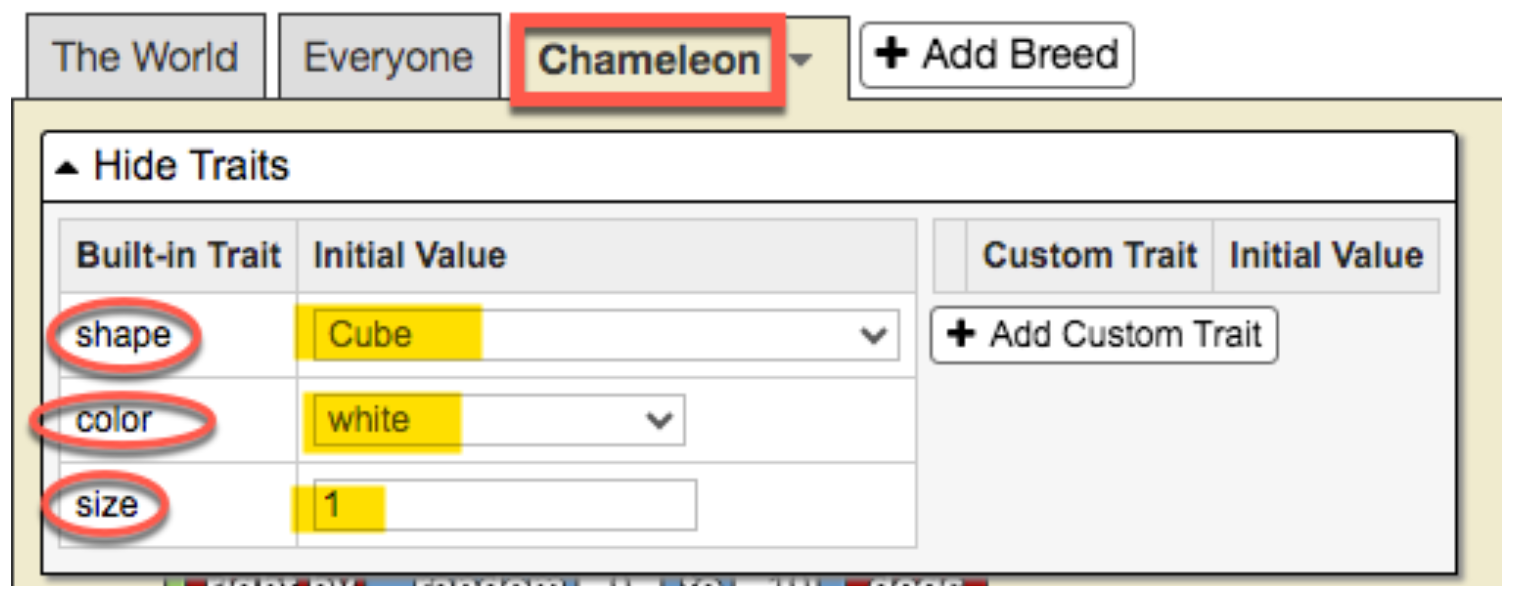](https://books.aprendercontecnologia.net/uploads/images/gallery/2025-02/chameleon-traits.png)
As can be seen in the previous figure, the default values of these three states are:
- **Shape**: Cube
- **Color**: White
- **Size**: 1
Initially we are going to create **three breeds of agents**: *male chameleon*; *female chameleon*; and *bird* (predator).
#### 1 **Create agent breeds**
We will leave the scenario for this challenge as it is, but eventually trees, grass, bushes, rocks, etc. could be added. (see section “*Expanding the simulation*”)
1. Go to **[http://sailctm.slnova.org](http://sailctm.slnova.org)**
2. Click on *My projects* → *Create new project*
3. Name the project. Click where it says “Title” and write there **“CHAMELEON”** (or whatever name you want).
4. For now we will leave the description of our model as it is by default.
5. We go to the bottom of the interface, where the “Turtle” tab appears and click on “Rename Breed”
[](https://books.aprendercontecnologia.net/uploads/images/gallery/2025-02/rename-breed.png)
6. We rename the “**Turtle**” breed as “**Male chameleon**” and we will see that the green “**Run code**” button appears, we click on it to turn it off.
7. [ 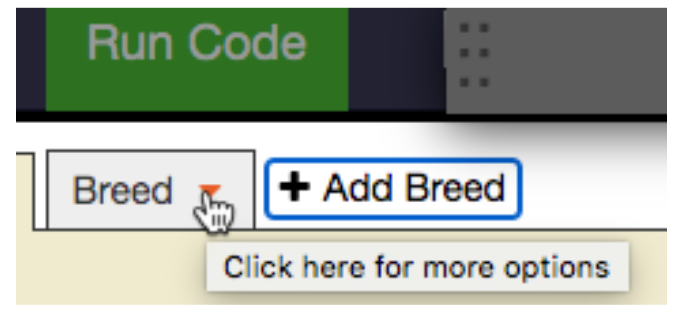 ](https://books.aprendercontecnologia.net/uploads/images/gallery/2025-02/breed.png) By default, when we create a model in StarLogo NOVA, there is always the breed “***Turtle***”, but of course you can rename that breed (just as we have done) and also add new breeds, which is what we will do now. To add a new breed, click on the “tab” **Add Breed** and we will see that a new tab is added with the name “**Breed**”. By clicking on the orange triangle, we can rename the new breed with the name we choose. In our case, we will call it “***Female Chameleon*”**.
8. We repeat the procedure to add the “***Bird***” breed and we are left with the three created breeds:
[](https://books.aprendercontecnologia.net/uploads/images/gallery/2025-02/toolbar.png)
#### 2 **Create agents themselves**
Although in the previous step we created the agent breeds, we **have not yet** created the agents themselves. This might seem a bit confusing at first, but keep reading, and the logic will become clear.
In the previous step, by creating the agent breeds, it’s as if we had created **categories**, but now we need to create the **agents** within each of those categories.
So, let’s start by creating an agent of the **“Male chameleon”** breed. The creation of agents, regardless of their breed, is always done in the **“The World”** tab following a standard procedure using the following blocks (below the image, we explain each step in the numbered order):
[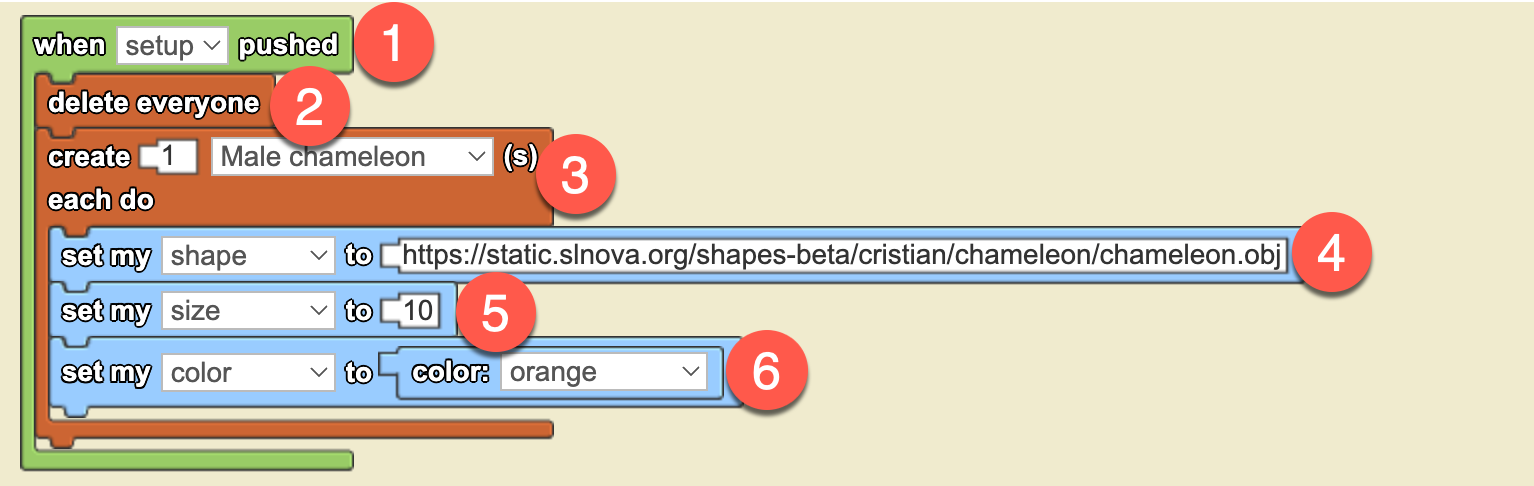](https://books.aprendercontecnologia.net/uploads/images/gallery/2025-02/create-agentes.png)
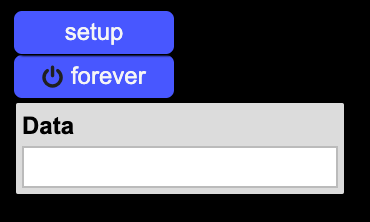
Whenever a new project is created in StarLogo NOVA, by default, *two buttons* are generated: **setup** and **forever**, along with *a data box* called **data:**
**[](https://books.aprendercontecnologia.net/uploads/images/gallery/2025-02/setup-forever-data.png)**
The **“setup”** button is a **one-time execution** button, meaning that when you click it, the actions are executed only once. On the other hand, the **“forever”** button is a **continuous execution** button, meaning that when you click it, it stays “on” and continuously executes the configured actions.
For now, we will focus on the **“setup”** button. Later on (within this same simulation), we will explore how the **“forever”** button works, while the **“Data”** box will be covered in another chapter. For now, we don’t need to worry about it.
##### **Step-by-Step Agent Creation, Block by Block**
We will now go through each of the blocks that make up the sequence to create an agent and give it a different appearance from the default one (**cubes**, **white in color**, and **size 1**).
1. That’s why the **first green-colored block**, which contains all the other blocks, is "**when setup pushed**". This means that when the user clicks the setup button, all the commands inside the green block will be executed.
2. The **second** block is "**delete everyone**", which ensures that every time agents are created, the previous ones are removed. Without this block, every time we press the "setup" button, new agents would be created without deleting the previous ones.
3. The **third** block (**brown-colored**) is "**create ... each do ...**". This block performs the magic of creating a specific number of agents from a particular breed with predetermined characteristics (different from the default characteristics that each agent has when created).
4. The **fourth**, **fifth**, and **sixth** blocks (**light blue-colored**) are precisely used to give the agents a chameleon-like appearance, making them orange and size 10. I believe there’s no need to explain what each block does, as it is quite evident.
Now, let's create our **male chameleon** agent with an **orange color**, **size 10**, and a **chameleon-like appearance**. To do this, click on the blue "setup" button in Spaceland, and you will see the following:
[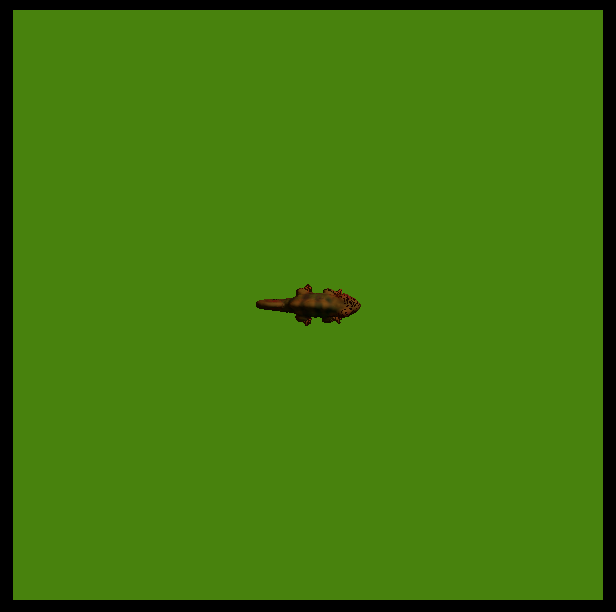](https://books.aprendercontecnologia.net/uploads/images/gallery/2025-02/chameleon-senital.png)
By default, the view in Spaceland is in **2D**, as if a camera were looking from above. To switch to a **3D** view, click the "**Edit camera**" button, then right-click on the stage (the green canvas) and use the mouse scroll wheel to zoom in and rotate the scene. When the scene looks the way you like it, click the "**Lock camera**" button. You can experiment with this yourself, but we also show it in an **animation** (no sound) so you can see how it might look:
We now have our male panther chameleon on the stage!
We proceed in the same way to create a **female chameleon agent**, which will be the one the **male chameleon** will court, and a **bird agent**, which will act as a predator. These will be the *characteristics* (***traits*** in StarLogo NOVA) of both agents:
- ##### **Female Chameleon**
- **Shape**: Chameleon (the same as the male)
- **Size**: 5 (smaller than the male)
- **Color**: Yellow
- ##### **Bird**
- **Shape**: Bird flying
- **Size**: 5
- **Color**: Black
And below, we can see what the code for creating the three agents looks like:
[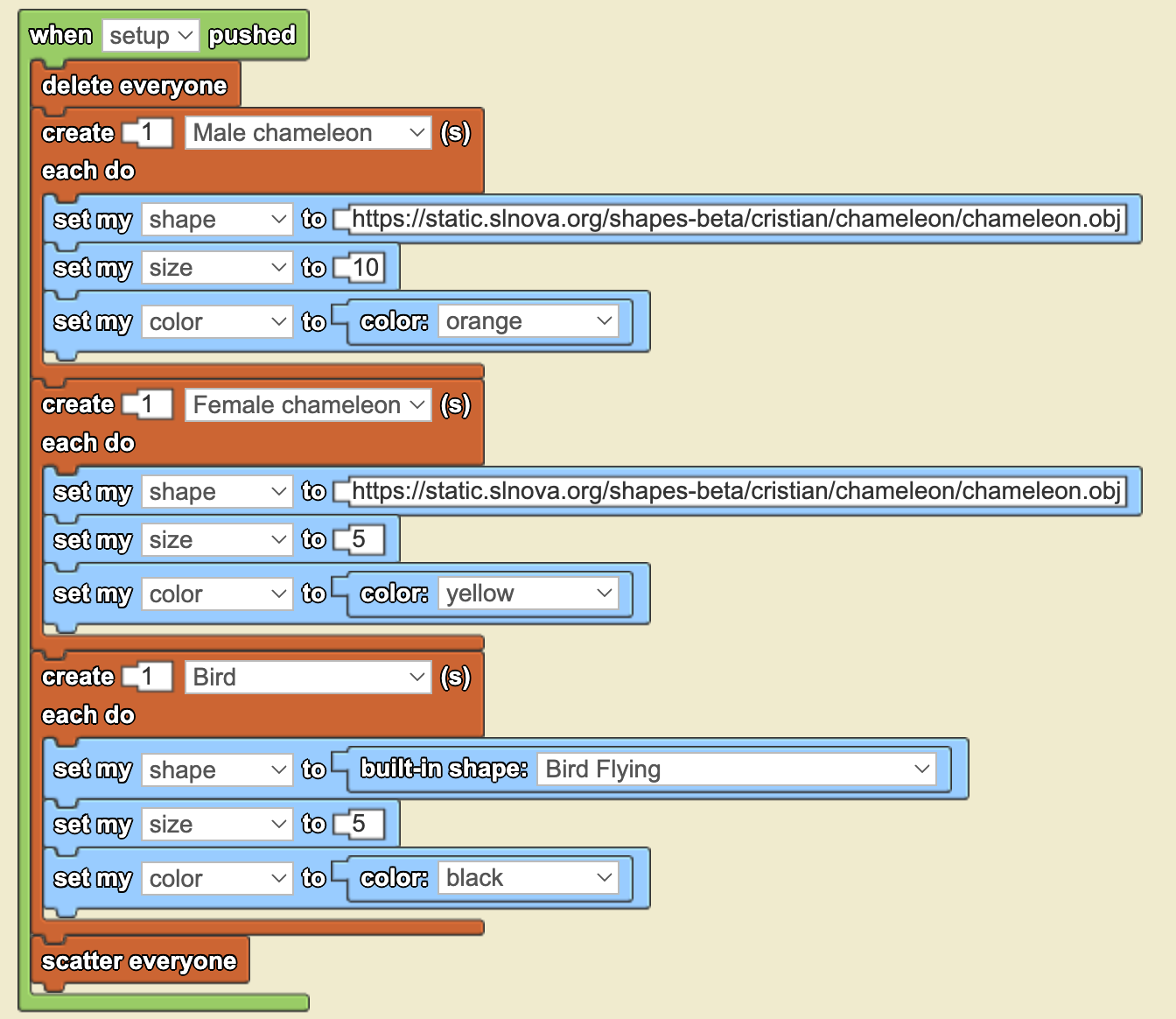](https://books.aprendercontecnologia.net/uploads/images/gallery/2025-02/code-three-initial-agents.png)
The last block, "**scatter everyone**", is necessary because, by default, StarLogo NOVA always creates agents in the center of the stage (at coordinates 0,0). If we don’t scatter the agents, they will overlap, and we won’t be able to see them. You can test this code yourself by clicking the "**setup**" button, and you will see something like this:
[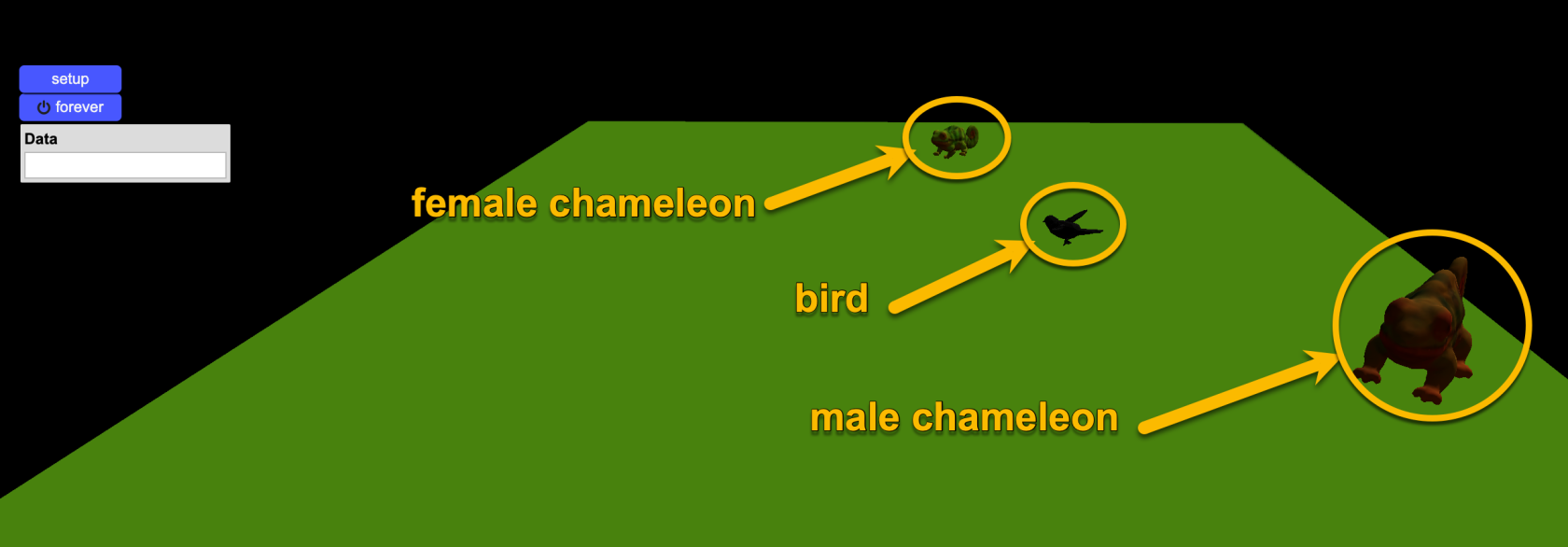](https://books.aprendercontecnologia.net/uploads/images/gallery/2025-02/three-agents-created-on-stage.png)
Now try removing the "scatter everyone" block and clicking "**setup**" again to see what happens. What happened? Why is only one agent visible? Now, add the “**scatter everyone**” block back and click “**setup**” again.
Finally, before concluding this section, I’d like you to take a close look at the code: Do you notice anything unusual about the syntax of the “**set my shape to**” blocks?
In the case of the male and female chameleons, there is a URL (a link) with a rather long web address ending in “.*obj*”. However, in the case of the bird, there is no URL—just the name of a shape (“flying bird”) preceded by the term "*built-in*".
The reason for this is that **StarLogo NOVA** has many preloaded images (“built-in shapes”), but it does not include a chameleon. That’s why, in order to use a chameleon figure, we had to upload one to a specific server and reference it via a URL.
Don’t worry—you won’t have to do this yourselves! We handled this as an exception for this exercise.
#### 3 **Making the agents move around the stage**
Once we have the three agents created, now we have to maken them move around. In this simulation, we will make all three agents move **randomly** in a similar way. We could make the bird fly, but since this is our first model with StarLogo NOVA, we will keep it moving at ground level.
**RANDOM WALKS**: A random walk is a simple yet powerful way to model movement in nature, where agents move in unpredictable directions at each step. This approach mimics real-world behaviors such as the foraging patterns of animals, the dispersion of pollen, or the motion of molecules in liquids. In **StarLogo NOV**A, using random walks allows agents to explore their environment without predefined paths, making simulations more dynamic and representative of natural systems.
In our case, for this particular model, we will use a type of random walk called “**wiggle walk**”.
In a wiggle walk, agents **move forward** while **randomly** turning slightly to the left and then slightly to the right at each step. The **random number** determining the degree of left and right turns makes them move in a zigzag pattern across the world, but always progressing forward:
[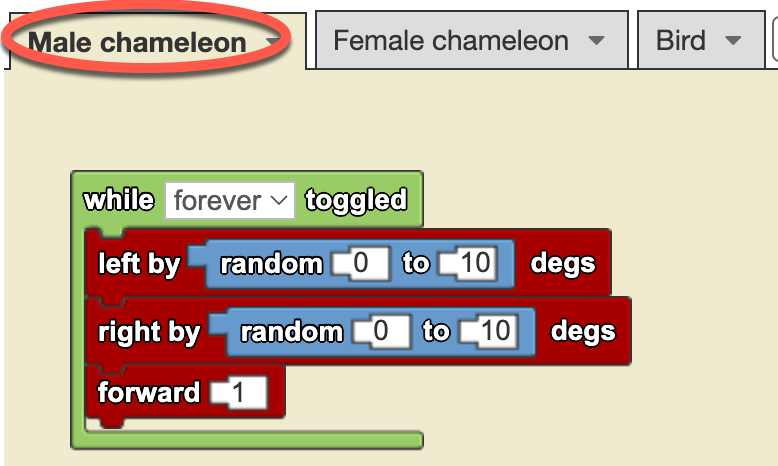](https://books.aprendercontecnologia.net/uploads/images/gallery/2025-02/wiggle-walk-male-chamaleon.png)
The “**random 0 to 10**” block generates a random number **between 0 and 10** each time it is read. It's like rolling a dice! Since it is inside a “**while forever toggled**” loop, it runs continuously. Unlike the “**setup**” button, which executes only once when clicked, the “**forever**” button keeps the simulation running. All blocks inside the green loop execute approximately five times per second, continuously, until the button is clicked again to stop the execution.
Looking at the **wiggle walk** code (before the gray rectangle above), you will notice that we have placed these blocks in the **“Male chameleon”** agent tab (see the **red ellipse** in the picture), whereas the previous blocks for creating agents were placed in the **“The World”** tab. We recommend remembering this as a kind of *mantra*:
Note that the **left** and **right** turns use a random number, while the forward steps are always set to 1. In this case, we have chosen this approach to simplify the model, but we could also use a random number for the number of steps the agent moves forward.
Now, by clicking the **“setup”** button and then clicking the **“forever”** button, we can see our **male chameleon** happily moving around the stage, while the **female chameleon** and the **bird** remain still:
[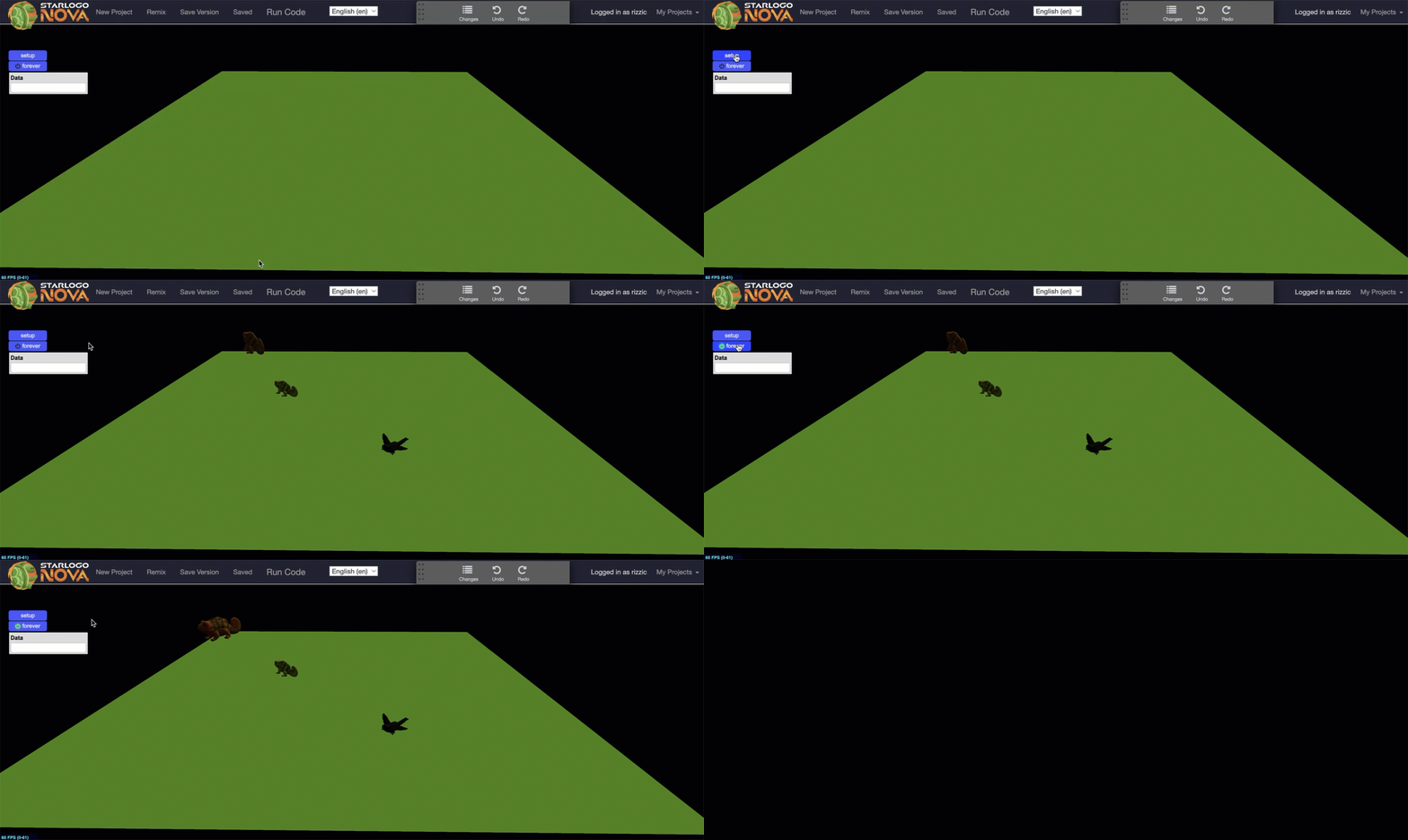](https://books.aprendercontecnologia.net/uploads/images/gallery/2025-02/male-chameleon-moving.gif)
To make the **female chameleon** and the **bird** move as well, we simply need to **copy** the *wiggle walk* blocks from the **Male Chameleon** breed tab (using right-click) and **paste** them into the corresponding tabs for each agent, as shown in the video below (no sound):
Now, all of our agents are **scattered across the stage, moving randomly**! (see animation below)[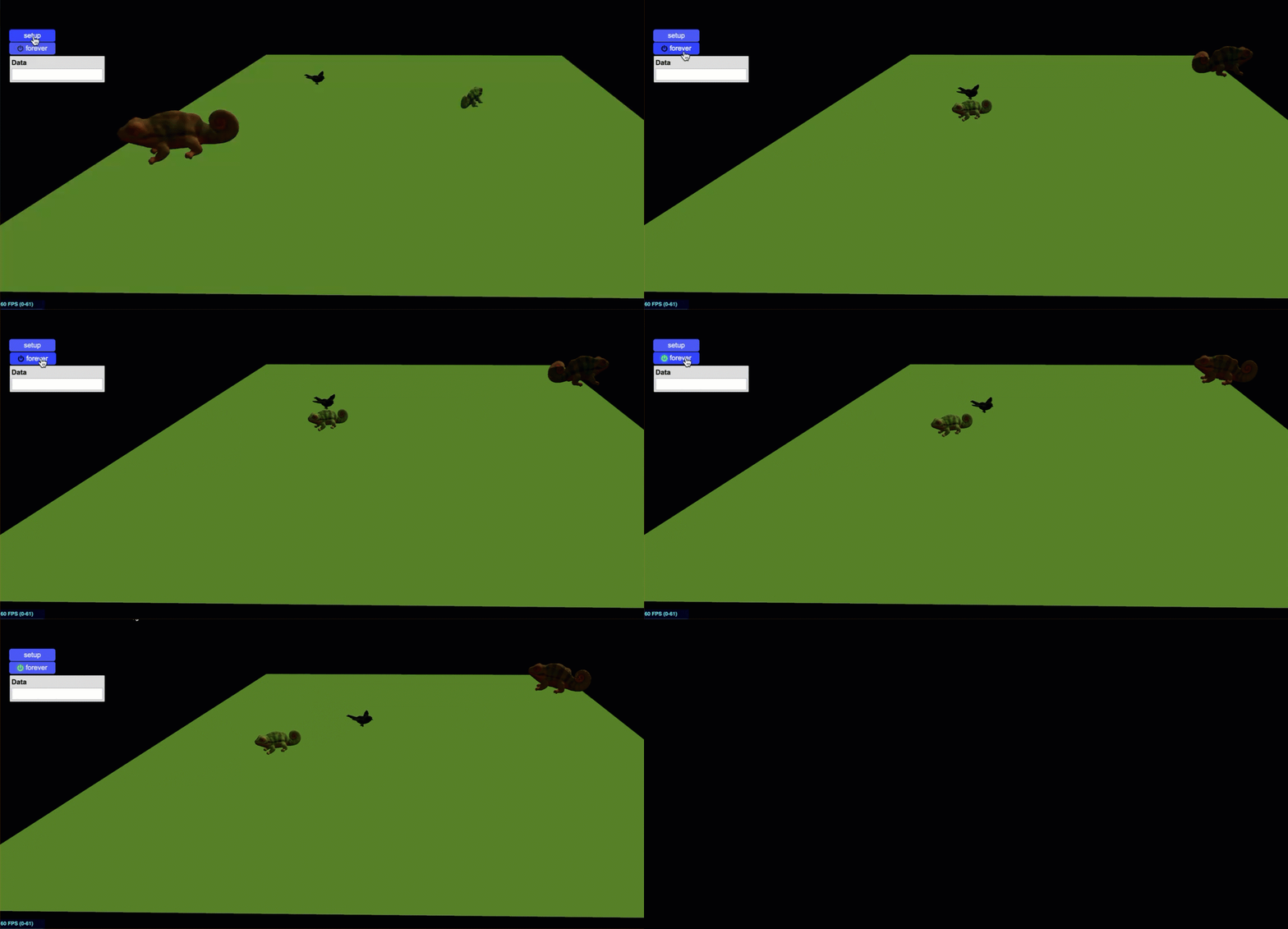](https://books.aprendercontecnologia.net/uploads/images/gallery/2025-02/three-agents-moving.gif)Our next challenge is to **program interactions *between* the agents** so that the **male chameleon reacts** differently when encountering the **female** and when facing the **predator.**
#### 4 **Agent interactions**
Now is the time to program the agent interactions as required by the challenge:
> The **three agents** (male, female and bird) could **move around the stage** and the **male chameleon** change color when interacting (touching or being close) with the **female** or the predator.
> When **approaching** the **female** he would **turn pinkish** and when **interacting** with the **predator** it would change its color to **reddish-yellow**.
We need to be more specific about our goals, so we will summarize them in a table.
**SOURCE AGENT**
**INTERACTION**
**TARGET AGENT**
**RESULT**
Male chameleon
Approaching within a 10-step radius
Female chameleon
Change the color to pink
Interact by touching or bumping
Predator
Change the color to yellow
Note that the difference between **touching** and **bumping into** is subtle: **touching** occurs when one agent makes slight contact with another, while **bumping** implies a **collision** between agents. In both cases, the interaction involves agents making physical contact.
In StarLogo NOVA, collisions play a central role because we are working within an agent-based simulation environment, where interactions are fundamental. Within this specific context, StarLogo NOVA follows a particular approach: suppose we want to program the second interaction depicted in the table above, where the **male chameleon** bumps into the **bird**. If we define this interaction between the **predator** (*agent1*) and the **male chameleon** (*agent2*), and place the blocks inside the **agent1** (the bird) tab, then **agent1** is considered the ***collider***, while **agent2** (the chameleon) is the ***collidee***.
The best way to illustrate this crucial concept is by displaying the exact blocks used to program this interaction:
[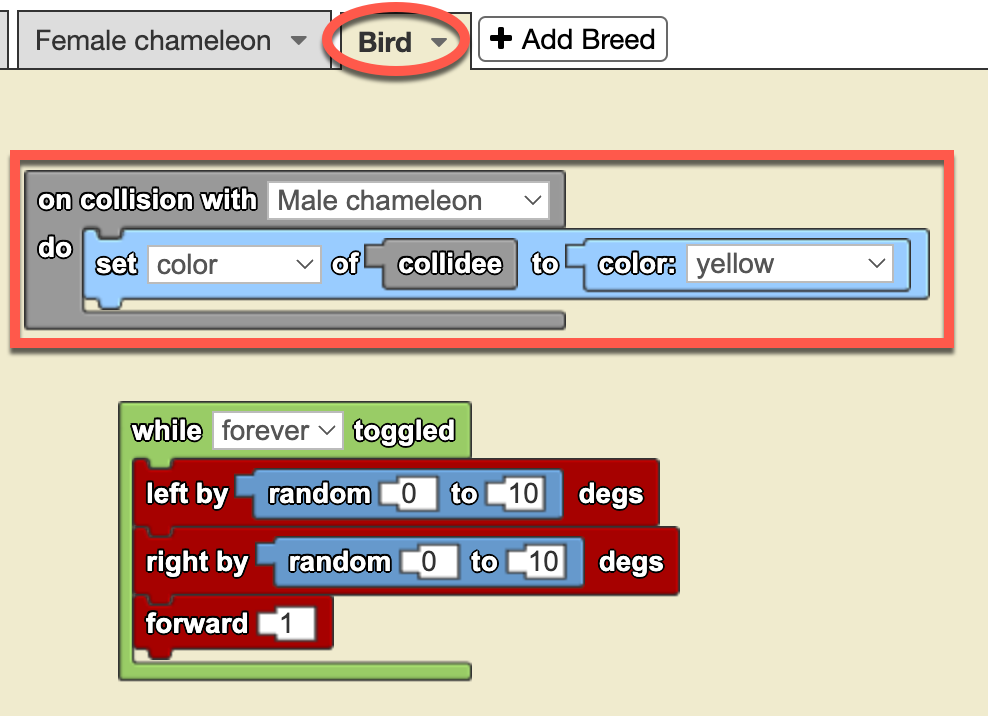](https://books.aprendercontecnologia.net/uploads/images/gallery/2025-02/chameleon-turns-yellow-bird-tab.png)
**Image**: *Collision blocks on Bird breed tab to make male chamelon change color to yellow when bumping into the bird*In the image on the left, you can see the block-based programming for detecting **collisions** between agents. Notice that the blocks are placed in the **Bird tab**, which means the **Bird** is the “***collider***”, while the **Male Chameleon** is the “***collidee***”.
We could have just as easily programmed the interaction in the **Male Chameleon** agent’s tab instead. However, in that case, the code blocks would be analogous but slightly different.
Take a moment to think about this. At the end of the challenge, when you access the full model, try deleting this code from the Bird tab and reprogramming the blocks in the Male Chameleon tab to see if you can achieve the same effect.
That is one of the great advantages (and joys) of experimenting with **computational simulations**: we can test our models by modifying the code and seeing what happens—without breaking any Erlenmeyer flasks, test tubes, or beakers.
Now that we have the code set up so that when the **Male Chameleon** collides with the **Bird** agent, the chameleon changes its color to yellow, let’s test it by clicking the **setup** button and then the **forever** button.
Note that before running the simulation, we have **increased** the **chameleon’s speed** to **3 steps forward** instead of 1 to give it a higher chance of interacting.
Since the agents turn **randomly** to the **left** and **right**, we cannot predict **exactly** when a **collision** will occur—or if it will happen at all. You might be wondering if it’s possible to program specific actions where a predator actively **chases** its prey. The answer is “yes, definitely!” And also program the prey to evade the predator!
We will explore this particular cases in one of the simulations in the upcoming chapters.
Now we need to program the interaction between the **Male Chameleon** and the **Female Chameleon** as part of the courtship**.**
In this case, we want the **Male Chameleon** to turn pink when the **Female Chameleon** comes **within a radius of 10 steps**, without touching him yet. Just as we programmed the previous interaction from the tab of the agent that was ***not*** affected (the **bird**), this time we will see how to do it **from the tab of the agent that will change** its appearance (the **male chameleon**). So let's do it:
[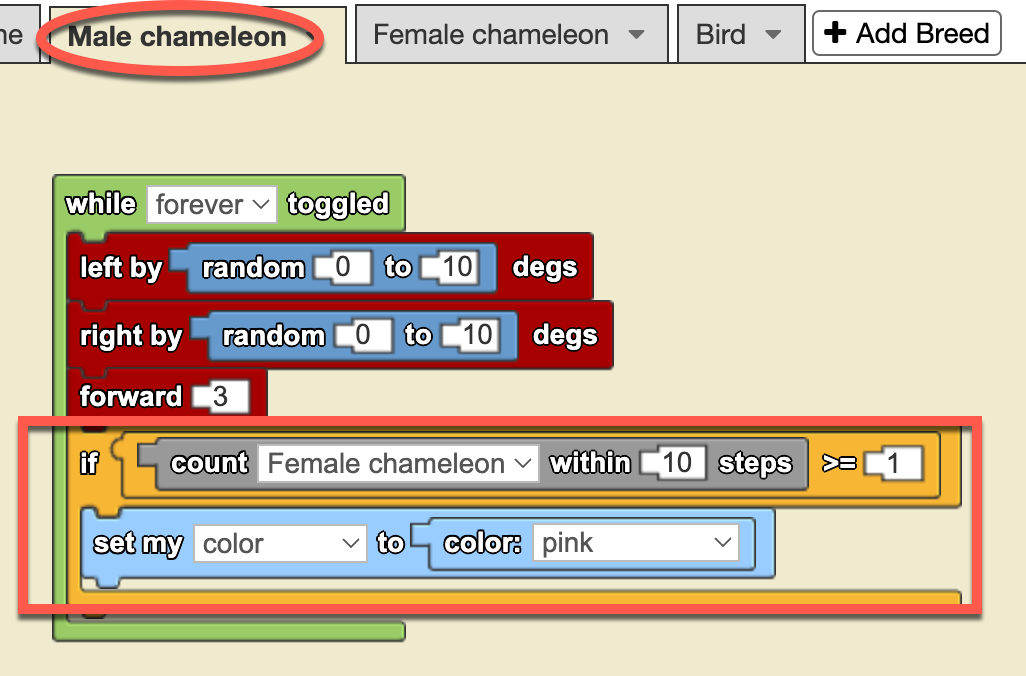](https://books.aprendercontecnologia.net/uploads/images/gallery/2025-02/detection-by-counting.png)In this case, we are introducing a new programming structure: the yellow **conditional** block “**IF…**”.
This structure **evaluates whether a condition is true or false** and executes a series of actions based on the blocks contained within it. If the condition is **true**, the actions inside the IF block will be executed; if not, they will be skipped.
The condition we are evaluating here is **whether or not there are any female chameleons within a radius of 10 steps**. The **gray** block “**count … within — steps**” performs this operation: it counts the number of agents of the chosen breed within a given range.
In our model, there is only **ONE female chameleon**, but the same code will also work if there are multiple. With that in mind, the **red squared command block** checks if there is **at least one female chameleon within a 10-step radius**. If the condition is **true**, the male chameleon’s color **changes to pink**; otherwise, nothing happens.
Now, let’s watch this animation to see how the code works in practice:
[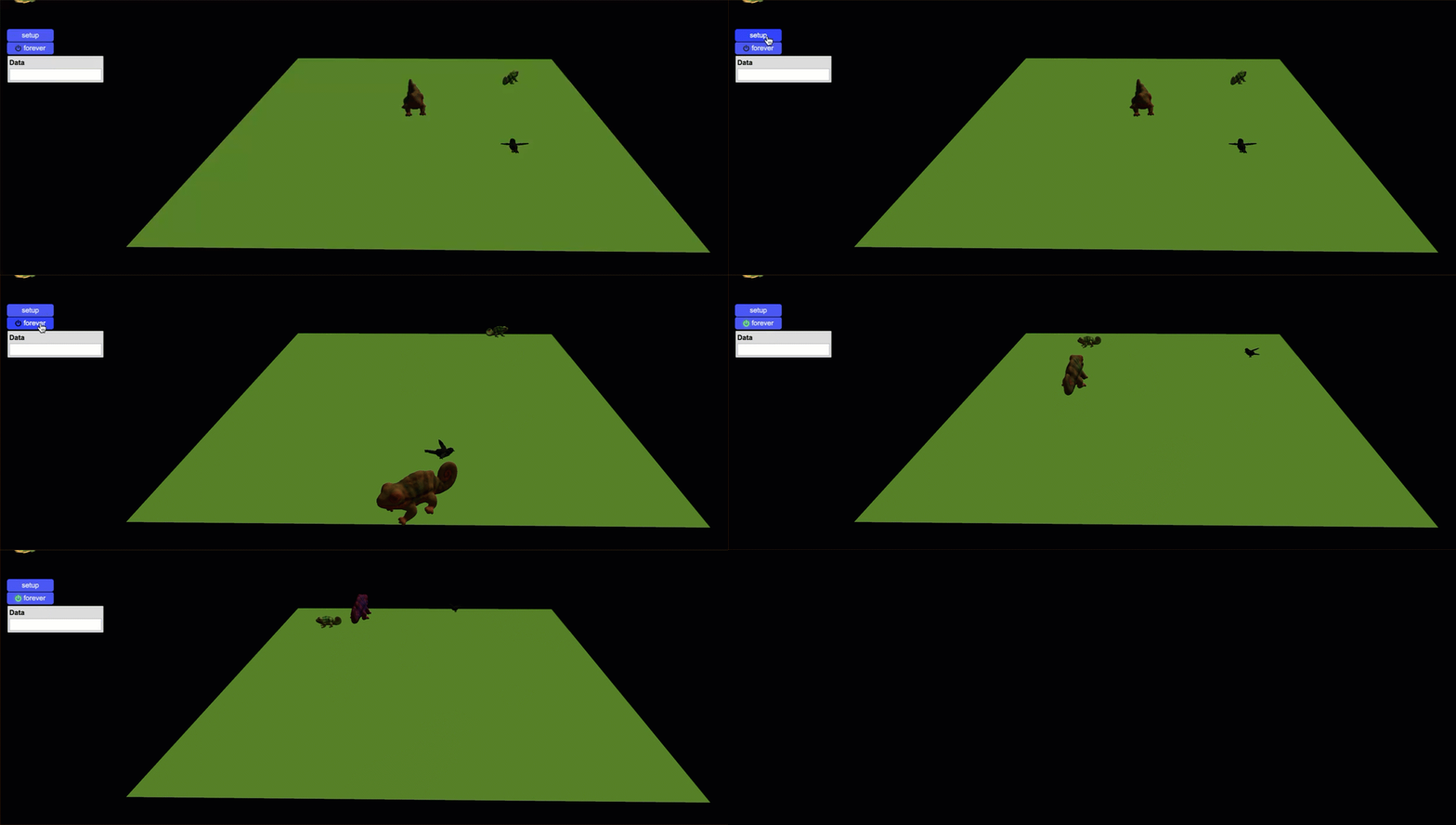](https://books.aprendercontecnologia.net/uploads/images/gallery/2025-02/male-chameleon-changes-to-pink.gif)
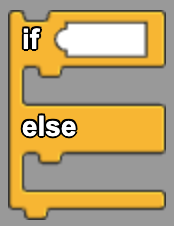In addition to the **IF…** structure, there is a complementary structure called **IF… ELSE...**, which allows us to define an alternative action when the condition is false. Instead of simply doing nothing when the condition is not met, the **ELSE** part of the block provides an explicit instruction for what should happen in that case.
For example, in our chameleon model, we could extend the current rule: If there is at least one female chameleon within a 10-step radius, the male chameleon turns **pink**. However, what if no female chameleons are nearby? With an **IF… ELSE....** structure, we could specify an alternative behavior, such as making the male chameleon turn **green** instead. This way, regardless of whether the condition is true or false, the program always executes an action.
With these two interactions—between the **male chameleon** and the **female chameleon**, and between the **male chameleon** and the **bird**—we have completed our very first computational model in StarLogo NOVA.
I know this might feel a bit daunting, especially if this is your first experience with agent-based, block-based programming environments. But trust me—as you progress through the upcoming challenges, you’ll start to notice that many structures and blocks follow similar patterns, and using them will become second nature.
Since this is our first computational modeling simulation, we will leave it as it is, with these two interactions, embracing the feeling of “mission accomplished!” In the upcoming chapters, we will build upon what you’ve learned here, introduce new structures, and explore additional programming and modeling concepts to tackle even more challenges.
You can explore the complet model here: \[[**Click to access**](https://sailctm.slnova.org/rizzic/projects/694838/)\]
### 4 ****Teacher's Toolbox****
This simulation opens the doors to emphasize the relationship between color change and courtship. Explain, for example, how male chameleons change color to attract females, exhibiting vibrant colors that indicate their health and vitality. Not only is this behavior an example of sexual selection, but it also offers an opportunity to discuss how organisms develop specific characteristics to increase their chances of reproduction. It can be an opportunity to encourage students to observe and record variations in color patterns during courtship and to relate them to concepts of evolutionary biology and animal behavior.
In addition, of course, to explore how color change is an evolutionary strategy against predators. Explain that chameleons have the ability to change their coloration to camouflage themselves in their environment and avoid being detected by predators such as birds of prey and owls. This phenomenon can be linked to concepts of adaptation and natural selection, highlighting how chameleons that are more efficient at camouflage are more likely to survive and reproduce. Encourage discussion about other defensive strategies in the animal kingdom and how these contribute to the survival of species. This activity can not only enrich your students' understanding of evolutionary mechanisms, but also the complexity and beauty of adaptations in nature.
### 5 ****Expanding the simulation****
- Add fixed objects to give the scene a more realistic look (StarLogo NOVA has many different tree and grass objects). Investigate what the natural settings of chameleons are like.
- What other agents could we add to add realism to the scenario? Fixed or mobile agents? Vary agents in size and distribution.
- Modify the scenario by stamping a part with a different color to simulate a fixed element such as a water pond with a blue ellipse. What other colors could be used and for what landscape elements?
